Wednesday, September 6, 2023

Unveiling Lakehouse – Data Warehouse Deep Dive Part3


This is this article we're looking at the good and not-so-good sides of the data warehouse and its potential replacement, the data lakehouse. In this article, we're checking out the things the data lakehouse needs to meet if it's going to fully replace the traditional warehouse.

The initial article “What is DataLakehouse?” introduces the data warehouse and examines its unique features. In the second article “ExplainingData Lakehouse as Cloud-native DW“, we explore data lakehouse architecture, aiming to adjust the essential requirements of data warehouse architecture to align with the priorities of cloud-native software design. Moving on, the fourth article will focus on the role of data modelling in creating, maintaining, and utilizing the lakehouse. Lastly, the final article will evaluate both the differences and the equally important similarities between the lakehouse and the platform-as-a-service (PaaS) data warehouse.


A Quick Recap of Data Lakehouse Architecture

The ideal data lakehouse architecture is like a puzzle where each piece works independently, unlike the classic data warehouse architecture. When I say "ideal," I mean the perfect design of this architecture. For instance, it breaks down the data warehouse capabilities into basic software functions (explained in the “Explaining Data Lakehouse as Cloud-native DW”) that operate as separate services.

These services are "loosely coupled," meaning they communicate through well-designed APIs. They don't need to know the internal details of the other services they interact with. Loose coupling is a fundamental principle of cloud-native software design, as discussed in previous articles. The ideal lakehouse is created by stacking these services on top of each other, allowing us, in theory, to replace one service's functions with another.

An alternative, practical approach links the data lake and data lakehouse services. Prominent providers like Databricks and Dremio have adopted this approach in their combined data lake/house implementations. This practical method has advantages compared to the ideal data lakehouse architecture, as we'll explore.

It's crucial to understand that while the tightly connected nature of a classic data warehouse has downsides, it also has advantages. Loose coupling can be a point of failure, especially when coordinating multiple, transaction-like operations in a distributed software architecture with independent services.


The Technical Side of Data Warehouse Architecture

Let's break down the formal, technical requirements of data warehouse architecture. To understand if the data lakehouse can truly replace the data warehouse, we need to see if its capabilities align with these requirements.

From a data warehouse perspective, what matters most is not just getting query results quickly but ensuring these results are consistent and reproducible. Striking a balance between speed, uniformity, and reproducibility is a real challenge.

Implementing this is trickier than it sounds. That's why solutions like Hive + Hadoop struggled as data warehouse replacements. Even distributed NoSQL systems often face issues when trying to step into the shoes of traditional databases or data warehouses.

Now, let's go through the specific requirements of data warehouse architecture:

  1. Central Data Repository: It serves as a single, central storage for business data, both current and historical.
  2. Panoptic View: Allows a comprehensive view across the entire business and its functional areas.
  3. Monitoring/Feedback Loop: Enables monitoring and feedback mechanisms into the business's performance.
  4. User Queries: Supports users in asking common or unpredictable (ad hoc) questions.
  5. Consistent Query Results: Ensures that everyone gets the same data through consistent and uniform query results.
  6. Concurrent Workloads: Handles concurrent jobs and users along with demanding mixed workloads.
  7. Data Management Controls: Enforces strict controls on data management and processing.
  8. Conflict Resolution: Anticipates and resolves conflicts arising from the simultaneous requirements of consistency, uniformity, and data processing controls.

Does the data lakehouse meet these criteria? It depends on how you implement the architecture. If you set up your lakehouse by using a SQL query service on a curated data lake section, you'll likely address requirements 1 through 4. However, handling requirements 5 through 8, which involve enforcing consistency and managing conflicts during concurrent operations, can be challenging for this type of implementation.


Reality Check: Maintaining Data Integrity Matters

In a typical, closely connected data warehouse setup, the warehouse often uses a relational database, or RDBMS. Most RDBMSs have safeguards known as ACID, ensuring they can handle multiple operations on data simultaneously while maintaining strong consistency.

While ACID safeguards are commonly linked with online transaction processing (OLTP) and RDBMS, it's essential to clarify that a data warehouse isn't an OLTP system. You don't necessarily need to set up a data warehouse on an RDBMS.

To simplify, the database engine in a data warehouse requires two things: a data store that can create and manage tables, and logic to resolve conflicts arising from concurrent data operations. It's possible to design the data warehouse as an append-only data store, committing new records over time, like adding new rows. With this approach, you avoid concurrency conflicts by only appending new records without changing or deleting existing ones. Coordination logic ensures that multiple users or jobs querying the warehouse simultaneously get the same records.

However, in reality, the most straightforward way to meet these requirements is by using an RDBMS. An RDBMS is optimized to efficiently perform essential analytical operations, like various types of joins. This is why the traditional on-premises data warehouse is often synonymous with the RDBMS. Attempts to replace it with alternatives like Hadoop + Hive have typically fallen short.

It's also why nearly all Platform-as-a-Service (PaaS) data warehouse services mimic RDBMS systems. As mentioned in a Explaining Data Lakehouse as Cloud-native DW article, if you choose to avoid in-database ACID safeguards, you must either build ACID logic into your application code, create and manage your own ACID-compliant database, or delegate this responsibility to a third-party database. In essence, maintaining data integrity is crucial.


Ensuring Data Consistency in Workloads

Whether we like it or not, production data warehouse workloads demand consistency, uniformity, and replicability. Imagine core business operations regularly querying the warehouse. In a real-world scenario, the data lakehouse replacing it must handle hundreds of such queries every second.

Let's break it down with an example – think of a credit application process that queries the lakehouse for credit scores multiple times per second. Statutory and regulatory requirements demand that simultaneous queries return accurate results, using the same scoring model and point-in-time data adjusted for customer variations.

Now, what if a concurrent operation tries to update the data used for the model's parameters? In a traditional RDBMS setup, ACID safeguards ensure this update only happens after committing the results of dependent credit-scoring operations.

Can a SQL query service do the same? Can it maintain these safeguards even when objects in the data lake's curated zone are accessible to other services, like an AWS Glue ETL service, which may update data simultaneously?

This example is quite common in real-world scenarios. In simple terms, if you want consistent, uniform, and replicable results, you need ACIDic safeguards. This is why data warehouse workloads insist on having these safeguards in place.


Can Data Lakehouse Architecture Ensure These Safeguards?

The answer isn't straightforward. The first challenge revolves around the difficulty of coordinating operations across loosely connected services. For instance, how can an independent SQL query service limit access to records in an independent data lake service? This limitation is crucial to prevent multiple users from changing items in the lake's curated area. In a tightly connected RDBMS, the database kernel handles this by locking rows in the table(s) where dependent data is stored, preventing other operations from altering them. The process is not as clear-cut in data lakehouse architecture with its layered stack of detached services.

A well-designed data lakehouse service should be able to enforce safeguards similar to ACID—especially if it controls concurrent access and modifications to objects in its data lake layer. Databricks and Dremio have addressed this challenge in their data lakehouse architecture implementations. They achieve this by reducing the loose coupling between services, ensuring more effective coordination of concurrent access and operations on shared resources.

However, achieving strong consistency becomes much tougher when the data lakehouse is structured as a stack of loosely connected, independent services. For example, having a distinct SQL query service on top of a separate data lake service, which sits on its own object storage service. In such a setup, it becomes challenging to ensure strong consistency because there's limited control over access to objects in the data lake.


Closing Thoughts: Navigating Distributed Challenges

In any distributed system, the main challenge is coordinating simultaneous access to shared resources while handling various operations on these resources across different locations and times. This applies whether software functions and their resources are closely or loosely connected.

For instance, a classic data warehouse tackles distributed processing by becoming a massively parallel processing (MPP) database. The MPP database kernel efficiently organizes and coordinates operations across nodes in the MPP cluster, resolving conflicts between operations. In simple terms, it makes sure it can enforce strict ACID safeguards while dealing with multiple operations happening at the same time across different places.

On the flip side, a loosely connected distributed software architecture, like data lakehouse architecture, deals with the challenge of coordinating access and managing dependencies across essentially independent services. It's a tricky problem.

This complexity is one reason why the data lakehouse, much like the data lake itself, typically operates as what's called an eventually consistent platform rather than a strongly consistent one.

On one hand, it can enforce ACID-like safeguards; on the other hand, it may lose data and struggle to consistently replicate results. Enforcing strict ACID safeguards would mean combining the data lakehouse and the data lake into one platform—closely connecting both services to each other. This seems to be the likely direction in the evolution of data lake/lakehouse concepts, assuming the idea of the data lakehouse sticks around.

However, implementing the data lakehouse as its own data lake essentially mirrors the evolution of the data warehouse. It involves closely connecting the lakehouse and the lake, creating a dependency on a single software platform and provider.

Stay tuned for the next article in this series, where we'll explore the use of data modeling with the data lakehouse.


Thursday, January 26, 2023

Unveiling Lakehouse – Explaining Data Lakehouse as Cloud-native DW Part2

In this article I focus on how the data lakehouse architecture compares with the classic data warehouse architecture. I imagine the data lakehouse architecture as an attempt to implement some of the core requirements of data warehouse architecture in a modern, cloud-native design. I will explore the advantages of cloud-native design, including the ability to dynamically provision resources in response to specific events, predetermined patterns, and other triggers. I also explore data lakehouse architecture as its own unique approach to addressing new or different types of practices, use cases, and consumers.

In an important sense, data lakehouse architecture is an effort to adapt the data warehouse and its architecture to the cloud, while also addressing a larger set of novel use cases, practices, and consumers. This claim is not as counterintuitive or daunting as it may seem. We can think of data warehouse architecture as a technical specification that enumerates and describes the set of requirements (features and capabilities) that the ideal data warehouse system must address, but does not specify how to design or implement the data warehouse. Designers are free to engineer their own novel implementations of the warehouse, such as what Joydeep Sen Sarma and Ashish Thusoo attempted with Apache Hive, a SQL interpreter for Hadoop, or what Google did with BigQuery, its NoSQL query-as-a-service offering.

The data lakehouse is a similar example. If a data lakehouse implementation addresses the set of requirements specified by data warehouse architecture, it can be considered a data warehouse.

In the What is Data Lakehouse? , we saw that data lakehouse architecture differs from the monolithic design of classic data warehouse implementations and the more tightly coupled designs of big data-era platforms like Hadoop+Hive or PaaS warehouses like Snowflake.

So, how is data lakehouse architecture different and why?


Adapting Data Warehouse Architecture to Cloud

The classic implementation of data warehouse architecture is based on outdated expectations, especially regarding how the warehouse’s functions and resources are instantiated, connected, and accessed. For example, early implementers of data warehouse architecture expected the warehouse to be physically implemented as an RDBMS and for its components to connect to each other using a low-latency, high-throughput bus. They also expected SQL to be the only way to access and manipulate data in the warehouse.

Another expectation was that the data warehouse would be online and available all the time, and its functions would be tightly coupled to each other. This was a feature of its implementation in an RDBMS, but it made it impractical (and impossible) to scale the warehouse’s resources independently.

None of these expectations are true in the cloud. We are familiar with the cloud as a metaphor for virtualization, which is the use of software to abstract and define various virtual resources, and for the scale-up/scale-down elasticity that is a defining characteristic of the cloud.

However, we may not spend as much time thinking about the cloud as a metaphor for event-driven provisioning of virtualized hardware, and the ability to provision software in response to events.

This on-demand dimension is arguably the most important practical benefit of the cloud’s elasticity and a significant difference between the data lakehouse and the classic data warehouse.

The Data Lakehouse as Cloud-native Data Warehouse

Event-driven design on this scale requires a different set of hardware and software requirements, which cloud-native software engineering concepts, technologies, and methods address. Instead of monolithic applications that run on always-on, always-available, physically implemented hardware resources, cloud-native design allows developers to instantiate discrete software functions as loosely coupled services in response to specific events. These loosely coupled services correspond to the functions of an application, and applications are composed of these loosely coupled services, like the data lakehouse and its layered architecture.

What makes the data lakehouse cloud-native? It is cloud-native when it decomposes most, if not all, of the software functions implemented in data warehouse architecture. These functions include:

        • One or more functions that can store, retrieve, and modify data;
        • one or more functions that can perform various operations (such as joins) on data;
        • one or more functions that expose interfaces for users and jobs to store, retrieve, modify data and specify different types of operations to perform on data;
        • one or more functions that manage and enforce data access and integrity safeguards;
        • one or more functions that generate or manage technical and business metadata;
        • one or more functions that manage and enforce data consistency safeguards when two or more users/jobs try to modify the same data simultaneously or when a new user and job tries to update data currently being accessed by prior users/jobs.

Using this as a guideline, we can say that a “pure” or “ideal” implementation of data lakehouse architecture would include:

      • The lakehouse service itself, which in addition to SQL query provides metadata management, data federation, and data cataloging capabilities. It also serves as a semantic layer by creating, maintaining, and versioning modeling logic, such as denormalized views applied to data in the lake.
      • The data lake, which at minimum provides schema enforcement and the ability to store, retrieve, modify, and schedule operations on objects/blobs in object storage. It also usually provides data profiling and discovery, metadata management, data cataloging, data engineering, and optionally data federation capabilities. It enforces access and data integrity safeguards across its zones and ideally generates and manages technical metadata for the data in these zones.
      • An object storage service that provides a scalable, cost-effective storage substrate and handles the work of storing, retrieving, and modifying data stored in file objects.

There are different ways to implement the data lakehouse. One option is to combine all these functions into a single omnibus platform, a data lake with its own data lakehouse, like what Databricks, Dremio, and others have done with their data lakehouse implementations.

Why Does Cloud-native Design Matter?

This raises some obvious questions. Why do this? What are the advantages of a loosely coupled architecture compared to the tightly integrated architecture of the classic data warehouse? As mentioned, one benefit of loose coupling is the ability to scale resources independently of each other, such as allocating more compute without adding storage or network resources. It also eliminates some dependencies that can cause software to break, so a change in one service will not necessarily impact or break other services, and the failure of a service will not necessarily cause other services to fail or lose data. Cloud-native design also uses mechanisms like service orchestration to manage and address service failures.

Another benefit of loose coupling is the potential to eliminate dependencies from reliance on a specific vendor’s or provider’s software. If services communicate and exchange data with each other solely through publicly documented APIs, it should be possible to replace a service that provides a set of functions (like SQL query) with an equivalent service. This is the premise of pure or ideal data lakehouse architecture, where each component is effectively commoditized (with equivalent services available from major cloud infrastructure providers, third-party SaaS and/or PaaS providers, and as open-source offerings) and reduces the risk of provider-specific lock-in.

The Data Lakehouse as Event-driven Data Warehouse

Cloud-native software design also expects the provisioning and deprovisioning of the hardware and software resources for loosely coupled cloud-native services to happen automatically. In other words, provisioning a cloud-native service means provisioning its enabling resources, and terminating a cloud-native service means to deprovision these resources. In a way, cloud-native design wants to make hardware and to some extent software disappear as variables in deploying, managing, maintaining, and especially scaling business services.

From the perspective of consumers and expert users, there are only services – tools that do things.

For example, if an ML engineer designs a pipeline to extract and transform data from 100 GBs of log files, a cloud-native compute engine will dynamically provision compute instances to process the workload. Once the engineer’s workload finishes, the engine will automatically terminate these instances.

Ideally, neither the engineer nor the usual IT support people (DBAs, systems and network administrators, so forth) need to do anything to provision these compute instances or the software and hardware resources they depend on. Instead, this all happens automatically – for example, in response to an API call initiated by the engineer. The classic on-premises data warehouse was not designed with this kind of cloud-native, event-driven computing paradigm in mind.

The Data Lakehouse as Its Own Thing

The data lakehouse is supposed to be its own thing, providing the six functions listed above. However, it depends on other services – specifically, an object storage service and optionally a data lake service – to provide basic data storage and core data management functions. In addition, data lakehouse architecture implements novel software functions that have no obvious parallel in classic data warehouse architecture and are unique to the data lakehouse. These functions include:

      • One or more functions that can access, store, retrieve, modify, and perform operations (like joins) on data stored in object storage and/or third-party services. The lakehouse simplifies access to data in Amazon S3, AWS Lake Formation, Amazon Redshift, so forth
      • One or more functions that can discover, profile, catalog, and/or facilitate access to distributed data stored in object storage and/or third-party services. For example, a modeler creates denormalized views that combine data stored in the data lakehouse and in the staging zone of an AWS Lake Formation (a data lake), and designs advanced models incorporating data from an Amazon Redshift sales data mart.

However, in this respect, the lakehouse is not different from a PaaS data warehouse service, which we will explore in depth in future articles.


Sunday, December 11, 2022

Unveiling Lakehouse – What is Data Lakehouse? Part 1


What is Data Lakehouse?

This article on the data lakehouse will aim to introduce the data lakehouse and describe what is new and different about it.

The Data Lakehouse Explained

The term “lakehouse” is derived from the two foundational technologies the data lake and the data warehouse. Lakehouse is a concept or data paradigm that can be built using different set of technologies to fulfill the objectives.


At a high level, the data lakehouse consists of the following components:

·                  Data lakehouse

·                  Data lake

·                  Object storage

The data lakehouse describes a data warehouse-like service that runs against a data lake, which sits on top of an object storage. These services are distributed in the sense that they are not consolidated into a single, monolithic application, as with a relational database. They are independent in the sense that they are loosely coupled or decoupled -- that is, they expose well-documented interfaces that permit them to communicate and exchange data with one another. Loose coupling is a foundational concept in distributed software architecture and a defining characteristic of cloud services and cloud-native design.

How Does the Data Lakehouse Work?

From the top to the bottom of the data lakehouse stack, each constituent service is more specialized than the service that sits “underneath” it.

·       Data lakehouse: The data lakehouse is a highly specialized abstraction layer or a semantic layer. That exposes data in the lake for operational reporting, ad hoc query, historical analysis, planning and forecasting, and other data warehousing workloads.

·       Data lake: The data lake is a less specialized abstraction layer. That schematizes and manages the objects contained in an underlying object storage service, and schedules operations to be performed on them. The data lake can efficiently ingest and store data of every type. Like structured relational data (which it persists in a columnar object format), semi structured (text, logs, documents), and un or multi structured (files of any type) data.

·       Object storage: As the foundation of the lakehouse stack, object storage consists of an even more basic abstraction layer: A performant and cost-effective means of provisioning and scaling storage, on-demand storage.

Again, for data lakehouse to work, the architecture must be loosely coupled. For example, several public cloud SQL query services, when combined with cloud data lake and object storage services, can be used to create the data lakehouse. This solution is the “ideal” data lakehouse in the sense that it is a rigorous implementation of a formal, loosely coupled architectural design. The SQL query service runs against the data lake service, which sits on top of an object storage service. Subscribers instantiate prebuilt queries, views, and data modeling logic in the SQL query service, which functions like a semantic layer. And this whole solution is the data lakehouse.

This implementation is distinct from the data lakehouse services that Databricks, Dremio, and others market. These implementations are coupled to a specific data lake implementation, with the result that deploying the lakehouse means, in effect, deploying each vendor’s data lake service, too.

The formal rigor of an ideal data lakehouse implementation has one obvious benefit: It is notionally easier to replace one type of service (for example, a SQL query) with an equivalent commercial or open-source service.

What Is New and Different About the Data Lakehouse?

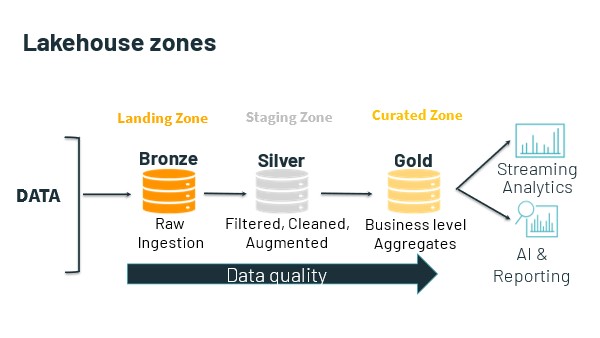
It all starts with the data lake. Again, the data lakehouse is a higher-level abstraction superimposed over the data in the lake. The lake usually consists of several zones, the names, and purposes of which vary according to implementation. At a minimum, Lakehouse consist of the following:

·                  one or more ingest or landing zones for data.

·                  one or more staging zones, in which experts work with and engineer data; and

·                  one or more "curated" zones, in which prepared and engineered data is made available for access.


Usually, the data lake is home to all an organization’s useful data. This data is already there. So, the data lakehouse begins with query against this data where it lives.

It is in the curated (GOLD) zone of the data lake that the data lakehouse itself lives. Although it is also able to access and query against data that is stored in the lake’s other zones. In this way the data lakehouse can support not only traditional data warehousing use cases, but also innovative use cases such as data science and machine learning and artificial intelligence engineering.

The following are the advantages of the data lakehouse.

1. More agile and less fragile than the data warehouse

Querying against data in the lake eliminates the multistep process involved in moving the data, engineering it and moving it again before loading it into the warehouse. (In extract, load, transform [ELT], data is engineered in the warehouse itself. This removes a second data movement operation.) This process is closely associated with the use of extract, transform, load (ETL) software. With the data lakehouse, instead of modeling data twice -- first, during the ETL phase, and, second, to design denormalized views for a semantic layer, or to instantiate data modeling and data engineering logic in code -- experts need only perform this second modeling step.

The result is less complicated (and less costly) ETL, and a less fragile data lakehouse.

2. Query against data in place in the data lake

Querying against the data lakehouse makes sense because all an organization’s business-critical data is already there -- that is, in the data lake. Data gets stored into the lake from sensors and other sources, from workload, business apps and services, from online transaction processing systems, from subscription feeds, and so on.

The strong claim is that the extra ability to query against data in the whole of the lake -- that is, its staging and non-curated zones -- can accelerate data delivery for time-sensitive use cases. A related claim is that it is useful to query against data in the lakehouse, even if an organization already has a data warehouse, at least for some time-sensitive use cases or practices.

The weak claim is that the lakehouse is a suitable replacement for the data warehouse.

3. Query against relational, semi-structured, and multi-structured data

The data lakehouse sits atop the data lake, which ingests, stores and manages data of every type. Moreover, the lake’s curated zone need not be restricted solely to relational data: Organizations can store and model time series, graph, document, and other types of data there. Even though this is possible with a data warehouse, it is not cost-effective.

4. More rapidly provision data for time-sensitive use cases

Expert users -- say, scientists working on a clinical trial -- can access raw trial results in the data lake’s non-curated ingest zone, or in a special zone created for this purpose. This data is not provisioned for access by all users; only expert users who understand the clinical data are permitted to access and work with it. Again, this and similar scenarios are possible because the lake functions as a central hub for data collection, access, and governance. The necessary data is already there, in the data lake’s raw or staging zones, “outside” the data lakehouse’s strictly governed zone. The organization is just giving a certain class of privileged experts early access to it.

5. Better support for DevOps and software engineering

Unlike the classic data warehouse, the lake and the lakehouse expose various access APIs, in addition to a SQL query interface.

For example, instead of relying on ODBC/JDBC interfaces and ORM techniques to acquire and transform data from the lakehouse -- or using ETL software that mandates the use of its own tool-specific programming language and IDE design facility -- a software engineer can use preferred dev tools and cloud services, so long as these are also supported by team’s DevOps toolchain. The data lake/lakehouse, with its diversity of data exchange methods, its abundance of co-local compute services, and, not least, the access it affords to raw data, is arguably a better “player” in the DevOps universe than is the data warehouse. In theory, it supports a larger variety of use cases, practices, and consumers -- especially expert users.

True, most RDBMSs, especially cloud PaaS RDBMSs, now support access using RESTful APIs and language-specific SDKs. This does not change the fact that some experts, particularly software engineers, are not -- at all -- charmed of the RDBMS.

Another consideration is that the data warehouse, especially, is a strictly governed repository. The data lakehouse imposes its own governance strictures, but the lake’s other zones can be less strictly governed. This makes the combination of the data lake + data lakehouse suitable for practices and use cases that require time-sensitive, raw, lightly prepared, so on, data (such as ML engineering).

6. Support more and different types of analytic practices.

For expert users, the data lakehouse simplifies the task of accessing and working with raw or semi-/multi-structured data.

Data scientists, ML, and AI engineers, and, not least, data engineers can put data into the lake, acquire data from it, and take advantage of its co-locality with an assortment of intra-cloud compute services to engineer data. Experts need not use SQL; rather, they can work with their preferred languages, libraries, services and tools (notebooks, editors, and favorite CLI shells). They can also use their preferred conceptual vocabularies. So, for example, experts can build and work with data pipelines, as distinct to designing ETL jobs. In place of an ETL tool, they can use a tool such as Apache Airflow to schedule, orchestrate, and monitor workflows.

Summary

It is impossible to untie the value and usefulness of the data lakehouse from that of the data lake. In theory, the combination of the two -- that is, the data lakehouse layered atop the data lake -- outperforms the usefulness, flexibility, and capabilities of the data warehouse. The discussion above sometimes refers separately to the data lake and to the data lakehouse. What is usually, however, is the co-locality of the data lakehouse with the data lake -- the “data lake/house,” if you like.


Saturday, June 25, 2016

Splunk Indexer Cluster Deployment

Splunk Indexer Cluster Deployment

Environment Setup
·         Download Ubuntu Linux 12.04.3 LTS or CentOS 6.7 (Any linux flavor)
·         Download Latest Splunk Enterprise tar ball ( For simplicity)
·         Download latest Universal Splunk Forwarder tar ball.

Pre-requisites

·         Do the necessary network settings and assign static IP if preferred.
·         Assign the hostname in network and hosts files.

Overview

1.      Identify requirement
Index cluster, with RF 2 and SF 2
For this number of nodes required will be RF +2
2indexer, 1 master node and 1 search head.

2.      Install the Splunk Enterprise cluster instances on your network
Install Splunk Enterprise on 4 nodes that is 2RF so two search peer nodes(indexers) and 1 master and 1search head.
 You need at least the replication factor number of peer nodes, but you might want to add more peers to boost indexing capacity, as mentioned in step 1d.
 You also need two more instances, one for the master node and the other for the search head.

3.      Enable clustering on the instances:
a. Enable the master node. See "Enable the master node".
Important: When the master starts up for the first time, it will block indexing on the peers until you have enabled and restarted the replication factor number of peers.
b. Enable the peer nodes. See "Enable the peer nodes".
c. Enable the cluster search head. It's easier to set up a search head for a cluster than for a non-clustered group of indexers. See "Enable the search head".

Step 1> Identify the nodes with their roles and assign hostname and name for simplicity and easy management. In the below scenario I’m setting up 1 Search Head, 2 Indexers, 1 Master Node and 1 forwarder node.


Step 2> Install Splunk Enterprise binaries on the Search Head, Indexer_01 and Indexer_02 assigned machines. (Extract the Splunk tar ball to the /opt folder as explained in the single node installation)
[root@splunk_standalone sbk_files]# tar -zxvf splunk-6.3.1-f3e41e4b37b2-Linux-x86_64.tgz -C /opt

Search Head Machine
[root@search_head splunk]# pwd
/opt/splunk
[root@search_head splunk]# ll
total 1800
drwxr-xr-x.  4  506  506    4096 Oct 30  2015 bin
-r--r--r--.  1  506  506      57 Oct 30  2015 copyright.txt
drwxr-xr-x. 16  506  506    4096 May  6 04:36 etc
drwxr-xr-x.  3  506  506    4096 Oct 30  2015 include
drwxr-xr-x.  6  506  506    4096 Oct 30  2015 lib
-r--r--r--.  1  506  506   62027 Oct 30  2015 license-eula.txt
drwxr-xr-x.  3  506  506    4096 Oct 30  2015 openssl
-r--r--r--.  1  506  506     509 Oct 30  2015 README-splunk.txt
drwxr-xr-x.  3  506  506    4096 Oct 30  2015 share
-r--r--r--.  1  506  506 1737206 Oct 30  2015 splunk-6.3.1-f3e41e4b37b2-linux-2.6-x86_64-manifest
drwx--x--x.  6 root root    4096 May  6 04:06 var
[root@search_head splunk]#


Indexer_01 Machine
[root@indexer_01 splunk]# pwd
/opt/splunk
[root@indexer_01 splunk]# ll
total 1800
drwxr-xr-x.  4  506  506    4096 Oct 30  2015 bin
-r--r--r--.  1  506  506      57 Oct 30  2015 copyright.txt
drwxr-xr-x. 16  506  506    4096 May  6 04:35 etc
drwxr-xr-x.  3  506  506    4096 Oct 30  2015 include
drwxr-xr-x.  6  506  506    4096 Oct 30  2015 lib
-r--r--r--.  1  506  506   62027 Oct 30  2015 license-eula.txt
drwxr-xr-x.  3  506  506    4096 Oct 30  2015 openssl
-r--r--r--.  1  506  506     509 Oct 30  2015 README-splunk.txt
drwxr-xr-x.  3  506  506    4096 Oct 30  2015 share
-r--r--r--.  1  506  506 1737206 Oct 30  2015 splunk-6.3.1-f3e41e4b37b2-linux-2.6-x86_64-manifest
drwx--x--x.  6 root root    4096 May  6 04:07 var
[root@indexer_01 splunk]#


Indexer_02 Machine
[root@indexer_02 splunk]# pwd
/opt/splunk
[root@indexer_02 splunk]# ll
total 1800
drwxr-xr-x.  4  506  506    4096 Oct 30  2015 bin
-r--r--r--.  1  506  506      57 Oct 30  2015 copyright.txt
drwxr-xr-x. 16  506  506    4096 May  8 22:15 etc
drwxr-xr-x.  3  506  506    4096 Oct 30  2015 include
drwxr-xr-x.  6  506  506    4096 Oct 30  2015 lib
-r--r--r--.  1  506  506   62027 Oct 30  2015 license-eula.txt
drwxr-xr-x.  3  506  506    4096 Oct 30  2015 openssl
-r--r--r--.  1  506  506     509 Oct 30  2015 README-splunk.txt
drwxr-xr-x.  3  506  506    4096 Oct 30  2015 share
-r--r--r--.  1  506  506 1737206 Oct 30  2015 splunk-6.3.1-f3e41e4b37b2-linux-2.6-x86_64-manifest
drwx--x--x.  6 root root    4096 May  8 22:08 var
[root@indexer_02 splunk]#

Master Node Machine
[root@c_master_node splunk]# pwd
/opt/splunk
[root@c_master_node splunk]# ll
total 1800
drwxr-xr-x.  4  506  506    4096 Oct 30  2015 bin
-r--r--r--.  1  506  506      57 Oct 30  2015 copyright.txt
drwxr-xr-x. 16  506  506    4096 May  9 01:53 etc
drwxr-xr-x.  3  506  506    4096 Oct 30  2015 include
drwxr-xr-x.  6  506  506    4096 Oct 30  2015 lib
-r--r--r--.  1  506  506   62027 Oct 30  2015 license-eula.txt
drwxr-xr-x.  3  506  506    4096 Oct 30  2015 openssl
-r--r--r--.  1  506  506     509 Oct 30  2015 README-splunk.txt
drwxr-xr-x.  3  506  506    4096 Oct 30  2015 share
-r--r--r--.  1  506  506 1737206 Oct 30  2015 splunk-6.3.1-f3e41e4b37b2-linux-2.6-x86_64-manifest
drwx--x--x.  6 root root    4096 May  9 01:49 var
[root@c_master_node splunk]#


Step 3> Install Universal Forwarder binaries into c_u_fwd_01 name assigned machine. (Extract the Splunk tar ball to the /opt folder as explained in the single node installation)
[root@splunk_standalone sbk_files]# tar -zxvf splunk-6.3.1-f3e41e4b37b2-Linux-x86_64.tgz -C /opt

C_U_Fwd_01 Machine
[root@u_fwd_01 splunkforwarder]# pwd
/opt/splunkforwarder
[root@u_fwd_01 splunkforwarder]# ll
total 132
drwxr-xr-x.  3  506  506  4096 Oct 30  2015 bin
-r--r--r--.  1  506  506    57 Oct 30  2015 copyright.txt
drwxr-xr-x. 13  506  506  4096 May  6 04:08 etc
drwxr-xr-x.  2  506  506  4096 Oct 30  2015 include
drwxr-xr-x.  4  506  506  4096 Oct 30  2015 lib
-r--r--r--.  1  506  506 62027 Oct 30  2015 license-eula.txt
drwxr-xr-x.  3  506  506  4096 Oct 30  2015 openssl
-r--r--r--.  1  506  506   509 Oct 30  2015 README-splunk.txt
drwxr-xr-x.  3  506  506  4096 Oct 30  2015 share
-r--r--r--.  1  506  506 31876 Oct 30  2015 splunkforwarder-6.3.1-f3e41e4b37b2-linux-2.6-x86_64-manifest
drwx--x--x.  6 root root  4096 May  6 04:08 var
[root@u_fwd_01 splunkforwarder]#


Configuring the instances into distributed deployment
Enable the master
To enable an indexer as the master node:
1. Click Settings in the upper right corner of Splunk Web.
2. In the Distributed environment group, click Clustering.
3. Select Enable clustering.
4. Select Master node and click Next.
5. There are a few fields to fill out:
  •  Replication Factor.The replication factor determines how many copies of data the cluster maintains. The default is 3. For more information on the replication factor, see "Replication factor". Choose the right replication factor now. It is inadvisable to increase the replication factor later, once the cluster has significant amounts of data.
  •  Search Factor. The search factor determines how many immediately searchable copies of data the cluster maintains. The default is 2. For more information on the search factor, see "Search factor". Choose the right search factor now. It is highly inadvisable to increase the search factor later, once the cluster has significant amounts of data.
  •  Security Key. This is the key that authenticates communication between the master and the peers and search heads. The key must be the same across all cluster instances. If you leave the field empty here, leave it empty on the peers and search heads as well.
6. Click Enable master node.
7. The message appears, "You must restart Splunk for the master node to become active. You can restart Splunk from Server Controls." Click Go to Server Controls to go to the Settings page where you can initiate the restart.


Enable the peer
To enable an indexer as a peer node:
1. Click Settings in the upper right corner of Splunk Web.
2. In the Distributed environment group, click Clustering.
3. Select Enable clustering.
4. Select Peer node and click Next.
5. There are a few fields to fill out:
  •  Master IP address or Hostname. Enter the master's IP address or hostname. For example: https://10.152.31.202.
  •  Master port. Enter the master's management port. For example: 8089.
  •  Peer replication port. This is the port on which the peer receives replicated data streamed from the other peers. You can specify any available, unused port for this purpose. This port must be different from the management port and receiving port.
  •  Security key. This is the key that authenticates communication between the master and the peers and search heads. The key must be the same across all cluster instances. If the master has a security key, you must enter it here.
6. Click Enable peer node.
7. The message appears, "You must restart Splunk for the peer node to become active." Click Go to Server Controls to go to the Settings page where you can initiate the restart.
8. Repeat this process for all the cluster's peer nodes.

Enable the search head
To enable a Splunk instance as a cluster search head:
1. Click Settings in the upper right corner of Splunk Web.
2. In the Distributed environment group, click Clustering.
3. Select Enable clustering.
4. Select Search head node and click Next.
5. There are a few fields to fill out:
  •  Master IP address or Hostname. Enter the master's IP address or hostname. For example: https://10.152.31.202.
  •  Master port. Enter the master's management port. For example: 8089.
  •  Security key. This is the key that authenticates communication between the master and the peers and search heads. The key must be the same across all cluster instances. If the master has a security key, you must enter it here.
6. Click Enable search head node.
7. The message appears, "You must restart Splunk for the search node to become active. You can restart Splunk from Server Controls" ClickGo to Server Controls to go to the Settings page where you can initiate the restart.

Use forwarders to get your data into the indexer cluster
Configure the connection from forwarder to peer node
There are three steps to setting up connections between forwarders and peer nodes:
1. Configure the peer nodes to receive data from forwarders.
2. Configure the forwarders to send data to the peer nodes.
3. Enable indexer acknowledgment for each forwarder. This step is required to ensure end-to-end data fidelity. If that is not a requirement for your deployment, you can skip this step

Example: A load-balancing forwarder with indexer acknowledgment
Here's a sample outputs.conf configuration for a forwarder that's using load balancing to send data in sequence to three peers in a cluster. It assumes that each of the peers has previously been configured to use 9997 for its receiving port:
[tcpout]
defaultGroup=my_LB_peers
[tcpout:my_LB_peers]
autoLBFrequency=40
server=10.10.10.1:9997,10.10.10.2:9997,10.10.10.3:9997
useACK=true